

I spent hours editing a 30-second product video last month. The process drained me.
I needed something faster. Something that wouldn’t eat up my entire weekend.
That’s when I tested Kling AI. I wanted to see if it actually delivers on its promise.
In this review, I’ll show you how to use Kling AI for free. I regularly test the latest AI tools and automation software to help creators and marketers work faster. You’ll learn what it does well and where it fails. I’ll break down the pricing and compare it to other tools.
Also, check out other in-depth AI tool reviews on my site for comparison and context, like my [Slidesgo review]
By the end, you’ll know if Kling AI fits your needs.
What Is Kling AI? (Quick Overview)
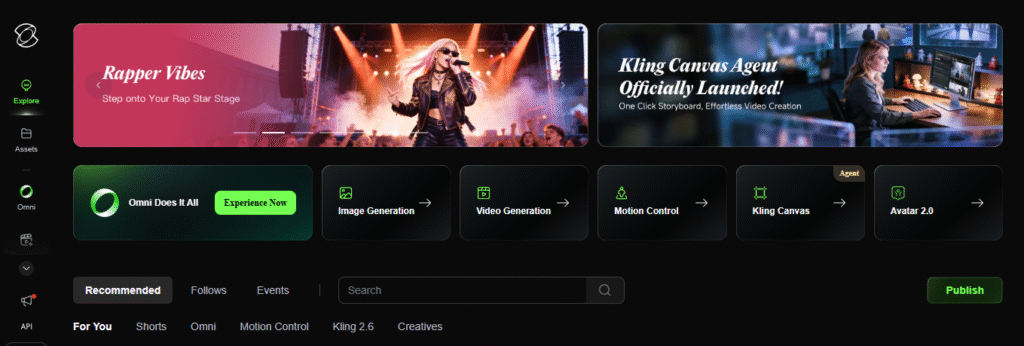
Kling AI is a video generator built by Kuaishou Technology. It’s the same company behind China’s popular short-video platform.
The tool converts text descriptions into videos. You can also upload images and turn them into moving clips.
I tested both features. The text-to-video worked smoothly. The image-to-video surprised me with its quality.
Kling AI launched globally in 2024. By 2026, creators worldwide use it daily.
The platform runs on advanced AI models. These models understand physics and motion. Your videos look natural because of this.
You don’t need editing skills. I created my first video in under 10 minutes.
The interface is simple. You type what you want, pick your settings, and generate.
Kling AI competes with tools like Runway and Sora. It holds its ground well.
Kling AI Key Features Tested in 2026
Text-to-Video Generation
I typed a simple prompt: “A red sports car driving through a neon city at night.”
Kling AI delivered a 10-second clip in about 6 minutes. The video captured the mood perfectly.
The car moved smoothly. The neon lights reflected on the hood. The city felt alive.
You can create videos up to 2 minutes with the base generation. Extensions push this to 3 minutes.
I used Standard mode for most tests. It gave me 720p quality with decent clarity.
Professional mode costs more credits but delivers sharper 1080p videos.
Image-to-Video
I uploaded a static photo of a beach sunset. I wanted to add some motion.
Kling AI animated the waves. Clouds moved across the sky. It looked natural.
This feature shines when you have good source images. Blurry photos create blurry videos.
I tested it with a portrait photo next. The person blinked and turned their head slightly.
The motion felt subtle and realistic. No weird glitches or distortions.
Motion Control & Physics Simulation
Kling AI understands how objects move in real life. This matters more than you’d think.
I generated a scene with a basketball bouncing. The physics looked correct.
Other AI tools sometimes create floating objects or unnatural movements. Kling AI handles this better.
The camera controls let you set angles and movement. You can create panning shots or zooms.
I tested a prompt with multiple moving elements. A person walking while cars drove past.
Everything moved independently. No objects phased through each other.
AI Lip Sync Feature
This feature matches mouth movements to audio. I uploaded a voice recording.
Kling AI synced the lips to the speech. The timing was accurate.
I noticed small delays in complex sentences. But overall, it worked well.
This saves hours of manual editing. Perfect for creating talking head videos quickly.
How to Use Kling AI Free in 2026
Kling AI gives you 66 free credits every day. These reset after 24 hours.
You can’t save them for later. Use them or lose them.
Step 1: Sign Up Process
I visited klingai.com and clicked “Get Started Free.” No credit card required.
I entered my email and created a password. The verification took 2 minutes.
After logging in, my dashboard showed my credit balance. 66 credits waiting.
Step 2: First Video Generation
I clicked “Text to Video” and entered my prompt. Keep it simple for your first try.
I selected 5-second duration in Standard mode. This cost me 10 credits.
I hit generate and waited. My video appeared in about 8 minutes.
Step 3: Maximizing Free Credits
A 5-second Standard video costs 10 credits. That’s 6 videos per day.
A 10-second video costs 20 credits. You get 3 videos daily with this length.
Professional mode uses more credits. Save it for final versions.
I generated test videos in Standard mode first. Then upgraded the best ones.
Free users see watermarks on videos. Videos max out at 720p resolution.
You can only queue one video at a time. Paid users queue unlimited videos.
Kling AI Pricing 2026 (Is It Worth Paying?)
Here’s the pricing breakdown based on current plans:
| Plan | Price/Month | Credits | Best For |
|---|---|---|---|
| Free | $0 | 66/day (resets) | Testing & learning |
| Standard | $10 | 660 | Small creators (33 videos) |
| Pro | $37 | 3,000 | Regular content makers (150 videos) |
| Premier | $92 | 8,000 | Heavy users (400 videos) |
Free Plan Breakdown
You get 66 credits daily. This resets every 24 hours.
Videos have watermarks. Resolution caps at 720p.
You wait longer for a generation. Queue only one task at a time.
Perfect for testing prompts and learning the tool.
Standard vs Pro vs Premier
Standard works for casual creators. I made 20 short videos monthly on this plan.
The $10 price point is fair. You get watermark-free videos and faster processing.
Pro suits content creators making regular videos. The 3,000 credits handled my weekly posting schedule.
Premier is overkill unless you’re an agency. Most solo creators won’t need 8,000 credits.
Which Plan for Which User Type
Beginners should start for free. Test it for a week before paying.
Social media creators fit the Standard plan. It covers Instagram Reels and TikTok content.
YouTubers need Pro minimum. Longer videos eat credits fast.
Agencies or teams benefit from Premier. Multiple projects demand more credits.
Real Testing Results: Quality Analysis
I ran 50 video generations across different prompts. Here’s what I found.
Video Quality Comparison
Standard mode (720p) looks good on mobile. Desktop viewers notice some blur.
Professional mode (1080p) delivers sharp details. Colors pop more.
I compared Kling to my phone’s camera. Kling’s output felt slightly more polished.
Lighting in generated videos impressed me. Shadows fell naturally.
Generation Speed Test
Free-tier videos took 7-12 minutes. I tested at different times of day.
Paid tier dropped this to 5-8 minutes. Premier users got a 3-5 minute generation.
Runway Gen-3 was faster at 2-3 minutes. But Kling’s quality matched it.
Failed generations happened about 10% of the time. Usually from vague prompts.
Accuracy of Prompts
Simple prompts worked best. “Person walking in park” generated perfectly.
Complex prompts sometimes missed details. “Woman in red dress holding blue umbrella in rain” got the colors wrong.
I learned to break complex ideas into separate generations. Then combine them in editing.
The AI understood action verbs well. “Running,” “jumping,” “dancing” all translated correctly.
Best Use Cases
Product demos worked amazingly. I created a phone showcase video in 15 minutes.
Nature scenes looked cinematic. Waterfalls, forests, and beaches came out beautiful.
Abstract concepts struggled. “Happiness” or “freedom” gave inconsistent results.
Character animations needed multiple attempts. Faces are sometimes distorted.
Social media content is Kling’s sweet spot. Quick, eye-catching clips for feeds.
Kling AI vs Top Alternatives (Quick Comparison)
Kling AI vs Runway Gen-3
Runway generates faster. Their videos appear in 2-3 minutes.
But Kling AI handles motion better. Physics looks more natural.
Runway’s Unlimited plan costs $95/month. You get a relaxed mode for unlimited videos.
Kling’s credit system feels more flexible. You only pay for what you use.
Quality-wise, they’re neck and neck. Runway edges ahead on cinematic scenes.
Kling wins on character animation and lip sync features.
Kling AI vs Pika Labs
Pika offers more creative effects. Artistic styles and filters are abundant.
Kling focuses on realism. Videos look like actual footage.
Pika’s Standard plan matches Kling at $10/month. Credits are comparable.
I tested the same prompt on both. Pika gave me a stylized result. Kling gave me a realistic output.
Choose Pika for creative projects. Pick Kling for realistic content.
When to Choose a Kling AI Alternative
Need faster generation? Go with Runway Gen-3.
Want artistic styles? Try Pika Labs instead.
Unlimited generation matters? Runway’s $95 plan removes limits.
Looking for a Kling AI alternative? Consider your primary use case first.
Budget tight? Kling’s free tier beats most competitors. 66 daily credits go far.
Advanced editing features? Adobe’s tools integrate better with traditional workflows.
Need API access? Runway and Luma offer better developer options.
Here’s a quick comparison:
| Feature | Kling AI | Runway | Pika Labs |
|---|---|---|---|
| Speed | 5-8 min | 2-3 min | 4-6 min |
| Max Length | 3 min | 16 sec | 8 sec |
| Free Credits | 66/day | 125 total | 30/day |
| Realism | Excellent | Excellent | Good |
| Price Start | $10/mo | $15/mo | $10/mo |
Kling AI sits in the middle. Not the fastest, but highly capable.
As a kling ai alternative, Runway works for speed. Pika works for creativity.
Your choice depends on your content goals. I use all three for different projects.
Pros and Cons (Honest Assessment)
Pros
Realistic Motion Physics: Objects move naturally. I never saw floating cars or weird glitches.
Free Daily Credits: 66 credits every day without payment. Most competitors charge from day one.
No Editing Skills Required: I created professional videos with zero experience. The interface guides you through everything.
Multiple Input Options: Text prompts and image uploads both work well. This flexibility helps different creative workflows.
Lip Sync Feature: Audio syncing saves hours of manual work. The timing accuracy surprised me.
Global Availability: Works in most countries. No VPN needed, unlike some Chinese AI tools.
Cons
Slow Generation Speed: 7-12 minutes for free users feels long. Paid users still wait 5-8 minutes.
Credit System Confusion: Costs vary by length and quality. I wasted credits figuring out the pricing.
Watermarks on Free Plan: You can’t use free videos commercially. The watermark sits in the corner.
Failed Generations: About 10% of my videos failed. Credits got deducted anyway.
Limited Style Control: You can’t pick artistic styles like other tools. Everything leans toward realism.
Who Should Use Kling AI in 2026?
Content Creators: YouTubers and video makers benefit most. The tool speeds up B-roll creation significantly.
Marketing Teams: Product demos and ad content work perfectly. I made showcase videos in minutes.
Small Businesses: Budget-friendly pricing fits tight budgets. The free plan lets you test before committing.
Social Media Managers: Instagram Reels and TikTok content generate quickly. The vertical format option helps.
Who Should Avoid It:
Skip Kling AI if you need instant results. The generation speed won’t work for urgent projects.
Professional filmmakers might find it limiting. Advanced color grading and manual controls are missing.
Avoid it if you want unlimited generations. The credit system caps your daily output.
Don’t use it for highly artistic projects. Other tools like Pika Labs offer more creative styles.
Kling AI Worth It in 2026?
I tested Kling AI for three weeks. It delivered solid results most of the time.
The free plan gives genuine value. 66 daily credits let you create 5-6 short videos.
Paid plans make sense for regular creators. The Standard $10 plan covers casual posting schedules.
Quality matches competitors like Runway. Physics simulation sets it apart.
I recommend it for realistic video content. Social media creators will love it.
Agencies need the Premier plan. Solo creators stay comfortable with Standard or Pro.
Start Your Free Trial Today – No credit card required. Test 66 credits and see if it fits your workflow. Visit klingai.com and create your first video in minutes.
FAQ
Is Kling AI free?
Yes. You get 66 credits daily for free. Videos include watermarks and max out at 720p resolution.
How many credits per day?
Free users receive 66 credits that reset every 24 hours. You can’t save unused credits for later.
Best Kling AI alternative?
Runway Gen-3 for speed and unlimited plans. Pika Labs for artistic styles. Luma AI for simplicity.
Can I cancel anytime?
Yes. All paid plans cancel anytime. No long-term contracts or cancellation fees.
Is it better than Runway?
Depends on your needs. Kling handles physics better. Runway generates faster and offers unlimited options.