

Finding someone’s phone number can feel like searching for a needle in a haystack. Whether you need to reconnect with an old friend, reach a business contact, or verify information for professional purposes, having the right approach makes all the difference.
You might have tried searching Google or scrolling through LinkedIn profiles without success. The truth is, finding accurate phone numbers requires the right methods and tools.
In this guide, I’ll walk you through 10 practical ways how to find someone’s phone numbers, from completely free options to premium tools that deliver verified contact information. By the end, you’ll know exactly which method works best for your specific needs.
Quick Comparison: How to Find Someone’s Phone Number (10 Best Methods)
| Method | Time Required | Cost | Success Rate | Best For |
|---|---|---|---|---|
| Phone Lookup Tools | 2-3 minutes | $$ | ⭐⭐⭐⭐⭐ | Business professionals |
| LinkedIn Search | 5-10 minutes | Free-$ | ⭐⭐⭐⭐ | Professional contacts |
| Google Search | 3-5 minutes | Free | ⭐⭐⭐ | Public information |
| Social Media | 5-15 minutes | Free | ⭐⭐⭐ | Personal contacts |
| Company Websites | 3-8 minutes | Free | ⭐⭐⭐ | Business numbers |
| Online Directories | 5-10 minutes | Free-$ | ⭐⭐ | US-based contacts |
| People Finder Services | 10-15 minutes | $$ | ⭐⭐⭐ | Detailed background info |
| WHOIS Lookup | 2-3 minutes | Free | ⭐⭐ | Website owners |
| Professional Networks | Varies | Free-$$ | ⭐⭐⭐ | Industry connections |
| Mutual Contacts | Varies | Free | ⭐⭐⭐⭐ | Personal introductions |
Method 1: Use a Phone Number Lookup Tool (Fastest & Most Reliable)
Best For: Sales professionals, recruiters, and anyone needing verified business contacts quickly
Phone number lookup tools are specialized databases designed specifically to help you find accurate contact information. These platforms collect data from multiple public sources, verify the information, and present it to you in seconds. Most of these platforms work alongside advanced email finder tools, making it easier to verify identities before reaching out.
Why This Method Works Best
These tools save you hours of manual searching because they’ve already done the heavy lifting. They continuously update their databases, verify phone numbers, and check them against do-not-call lists to ensure compliance.
Top Phone Lookup Tools
1. Saleshandy Lead Finder
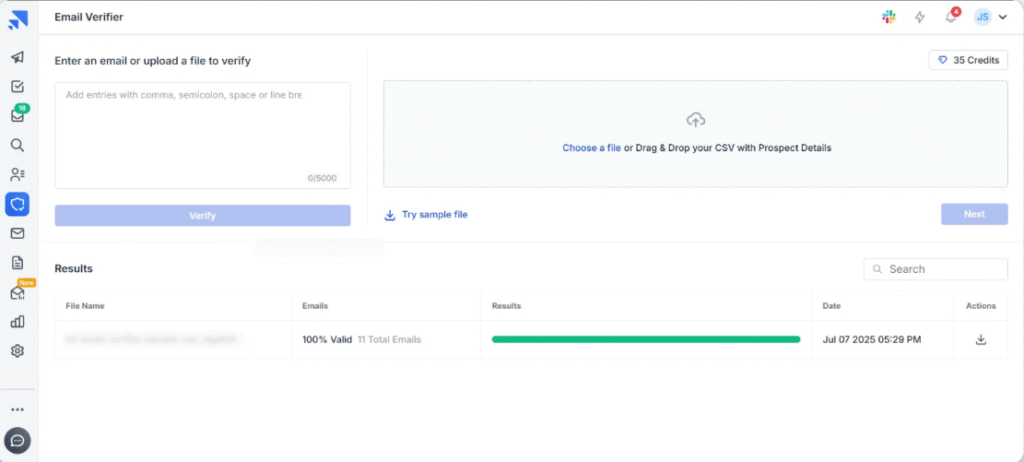
- Access to millions of verified phone numbers
- Search by name, email, or company
- Includes email addresses and social profiles
- Pricing: Free trial with 5 credits monthly
2. ZoomInfo
- Extensive B2B contact database
- Advanced filtering options
- CRM integration
- Pricing: Custom enterprise pricing
3. Apollo.io

- 250+ million contacts
- Chrome extension for quick lookups
- Email and phone number verification
- Pricing: Free plan available, paid from $49/month
4. Cognism
- Phone-verified mobile numbers
- GDPR and CCPA compliant
- 87% connection rate
- Pricing: Custom pricing based on needs
How to Use Phone Lookup Tools
- Sign up for a free trial on your chosen platform
- Enter the person’s name and company (or email address)
- Review the search results and verify the information
- Export or save the contact details
- Use the phone number for your outreach
Pro Tip
Most premium tools offer free trials. Test 2-3 platforms before committing to find which database has better coverage for your target audience.
Method 2: Search on LinkedIn (Best Free Professional Method)
Best For: Finding business professionals and decision-makers
LinkedIn hosts over 1 billion professionals, making it an excellent resource for finding business contacts. While phone numbers aren’t directly displayed, you can find them through profile contact sections or by using LinkedIn email finder tools.
How to Find Phone Numbers on LinkedIn
Step 1: Use LinkedIn’s Search Function
- Type the person’s name in the search bar
- Add filters like company, location, or job title
- Look through results to find the right person
Step 2: Check Their Contact Information
- Visit their profile
- Click “Contact Info” below their profile picture
- Look for phone numbers in the contact section
- Note: Only visible if they’ve made it public
And Step 3: Use LinkedIn Chrome Extensions
Chrome extensions can reveal hidden contact information:
- Kaspr: Extracts phone numbers directly from LinkedIn profiles
- Lusha: Provides business phone numbers and emails
- GetProspect: Finds contact details with one click
LinkedIn Search Tips
- Add location filters to find the right person with common names
- Check their recent activity to confirm the profile is active
- Look at their “About” section for alternative contact methods
- Connect with mutual contacts who might introduce you
When LinkedIn Doesn’t Work
If someone hasn’t added their phone number to LinkedIn, try these alternatives:
- Send them a connection request with a personalized message
- Use InMail to ask for their contact information directly
- Search for their company’s main number and ask for an extension
Method 3: Try Google Search (Free and Surprisingly Effective)
Best For: Finding publicly listed contact information
Google indexes billions of web pages, including many that contain phone numbers. The key is knowing the right search techniques to filter through the noise.
Basic Google Search Strategies
Simple Name Search:
“John Smith” phone number
“John Smith” contact
Add Company Name:
“John Smith” “ABC Company” phone
Include Location:
“John Smith” Chicago phone number
Advanced Google Search Operators
These special commands help you find phone numbers faster:
Site-Specific Search:
site:linkedin.com “John Smith” phone
site:company.com contact information
File Type Search:
filetype:pdf “John Smith” contact
Title-Based Search:
intitle:”contact us” “ABC Company”
Combination Search:
“John Smith” (phone OR mobile OR contact) “ABC Company”
Where Google Finds Phone Numbers
- Company websites and contact pages
- Professional directory listings
- Press releases and news articles
- Event speaker profiles
- Conference attendee lists
- Academic and research publications
Pro Tips for Google Searches
- Use quotation marks for exact phrases
- Try different name variations (John Smith, J. Smith, John M. Smith)
- Search for email addresses first, then do reverse lookups
- Check the first 3 pages of results thoroughly
- Look for recent results (use Tools > Any time > Past year)
Method 4: Check Social Media Platforms
Best For: Finding personal contacts and casual business connections
While LinkedIn is the top professional network, other social media platforms can also help you find phone numbers, especially for less formal connections.
How to Search Facebook:
- Use the search bar to find the person’s profile
- Check their “About” section under Contact Information
- Look at their business page if they have one
- Review their recent posts for contact details
Privacy Note: Many users hide their phone numbers, but business pages often display contact information publicly.
Finding Numbers on Instagram:
- Business accounts show contact buttons
- Check their bio for contact information
- Look for website links that might have contact pages
- Send a direct message asking for contact details
Twitter/X
Twitter Search Methods:
- Search their tweets for contact information
- Check their bio and pinned tweets
- Look for customer service interactions
- Review their website link
TikTok
For Younger Professionals:
- Business accounts may list contact information
- Check bio links to external websites
- Creator marketplace profiles sometimes include contacts
Social Media Best Practices
- Always respect privacy settings
- Don’t screenshot or share private information
- Send a polite message before calling
- Verify the account is real before using the contact information
Method 5: Visit Company Websites
Best For: Finding official business contact numbers
Company websites are reliable sources for verified business contact information. Many businesses now replace phone numbers with live chat, so knowing the best chatbot for lead generation can help you capture contacts when numbers aren’t listed. The challenge is knowing where to look.
Where to Find Phone Numbers on Websites
Contact Page:
- Look for “Contact Us” in the main menu
- Scroll to the footer for contact links
- Check for department-specific numbers
- Note: Some sites use contact forms instead of listing numbers
About Us Page:
- Leadership team profiles often include direct lines
- Company history sections may list original contact info
- Team member bios sometimes include extensions
Investor Relations:
- Public companies list investor contact numbers
- Quarterly reports contain contact details
- Press release contacts are usually available
Regional Office Pages:
- International companies list local numbers
- Each office may have direct lines
- Regional managers often have published contacts
Website Search Techniques
Using Site Search: Most websites have a search function. Try searching for:
- “Phone”
- “Contact”
- “Call us”
- The person’s name
Checking the Footer: Scroll to the bottom of any page to find:
- Corporate headquarters number
- Customer service lines
- Regional office contacts
Press/Media Sections:
- Journalist contacts often include direct lines
- PR departments list phone numbers
- Media kits contain contact information
Pro Tips
- Check the website’s sitemap for hidden contact pages
- Look at older versions using the Wayback Machine
- Try different country/language versions of the site
- Sign up for newsletters that might include contact info
Method 6: Search Online Directories
Best For: Finding phone numbers in the United States
Online directories work like digital phone books, collecting publicly available contact information and organizing it by name, location, or business type.
Popular Free Directories
1. Whitepages
- Largest online directory in the US
- Free basic searches
- Premium option for detailed reports
- Includes address history
2. TruePeopleSearch
- Completely free
- No registration required
- Shows relatives and associates
- Limited to US residents
3. YellowPages
- Best for business contacts
- Category-based searching
- Local business focus
- Includes reviews and hours
4. AnyWho
- AT&T’s directory service
- Free reverse phone lookup
- Business and residential listings
- US-focused database
How to Use Online Directories
- Go to your chosen directory website
- Enter the person’s full name
- Add location details (city and state)
- Review the results list
- Verify the information matches your target
- Note: Free results may be limited
Limitations of Online Directories
- Information can be outdated
- Many people opt out of listings
- Limited international coverage
- Free versions show partial information
- May require payment for full details
Directory Search Tips
- Try multiple directories for better results
- Use different name spellings
- Include middle initials when possible
- Cross-check information between directories
- Be aware of privacy settings that hide information
Method 7: Use People Search Engines
Best For: Detailed background information and phone numbers
People search engines go beyond simple directories by aggregating information from multiple sources including public records, social media, and marketing databases.
Top People Search Services
1. Spokeo
- Searches billions of public records
- Social media profile aggregation
- Phone number verification
- Pricing: $19.95/month
2. BeenVerified
- Comprehensive background reports
- Reverse phone lookup included
- Criminal records check
- Pricing: $26.89/month
3. Intelius
- Deep web searching
- Property records included
- Email address finder
- Pricing: $24.86/month
4. PeopleFinders
- Fast search results
- Multiple contact methods
- Relative information included
- Pricing: $27.95/month
What These Services Provide
- Current and previous phone numbers
- Email addresses
- Physical addresses and moving history
- Social media profiles
- Relatives and associates
- Age and birth information
- Property ownership records
- Court and criminal records
How to Use People Finders
- Choose a service and sign up for a trial
- Enter the person’s name and location
- Review the initial results
- Purchase a full report if needed
- Verify the information is current
- Use the contact details responsibly
Important Considerations
Privacy Concerns:
- These services use public information
- Anyone can search for you too
- You can opt out of most services
- Always respect privacy laws
Accuracy Issues:
- Information may be outdated
- Common names create confusion
- Multiple people with same name
- Verify before using contact details
Method 8: Check WHOIS Domain Records
Best For: Finding contact information for website owners
Every website domain has registration information that sometimes includes phone numbers. This method works great for finding business owners or company contact details.
How WHOIS Lookup Works
When someone registers a domain name, they must provide contact information. This data is stored in WHOIS databases and can be publicly searched.
Steps to Use WHOIS Lookup
1. Choose a WHOIS Service:
- who.is
- ICANN WHOIS
- DomainTools
- GoDaddy WHOIS
2. Enter the Domain Name:
example.com (without http:// or www)
3. Review the Results: Look for these sections:
- Registrant Contact (Owner information)
- Administrative Contact
- Technical Contact
4. Find Phone Numbers: Phone numbers appear as:
- Registrant Phone
- Admin Phone
- Tech Phone
What You Can Find in WHOIS
- Company name
- Contact person name
- Phone numbers
- Email addresses
- Physical address
- Registration date
- Expiration date
WHOIS Limitations
Privacy Protection: Many domain owners use privacy services that hide their information. Instead of real details, you’ll see:
- Generic company names
- Privacy service contact info
- Masked email addresses
- No phone numbers
What to Do When Privacy is Enabled:
- Try contacting through the privacy service
- Look for contact information on the website itself
- Search for the company name in other databases
- Try social media platforms
WHOIS Pro Tips
- Search for multiple domains owned by the same company
- Older domains may have less privacy protection
- Compare current and historical WHOIS data
- Use the email address for reverse lookups
Method 9: Network Through Professional Contacts
Best For: Getting warm introductions and verified contact information
Sometimes the best way to get someone’s phone number is through mutual connections. This method builds trust and increases your chances of successful contact.
Finding Mutual Connections
LinkedIn Connections:
- View the person’s LinkedIn profile
- Look for “x mutual connections”
- Identify connections who know them well
- Request an introduction
Professional Groups:
- Industry associations
- Alumni networks
- Chamber of commerce
- Professional meetup groups
Social Circles:
- Former colleagues
- College alumni
- Conference attendees
- Volunteer organizations
How to Request Contact Information
Polite Email Template:
Hi [Connection Name],
I hope you’re doing well! I noticed you’re connected with [Target Person] at [Company].
I’m interested in speaking with them about [brief reason]. Would you feel comfortable introducing us or sharing their contact information?
I appreciate any help you can provide.
Best regards,
[Your Name]
LinkedIn Message Template:
Hi [Name],
I saw you’re connected with [Target Person]. I’m reaching out because [specific reason].
Would you mind making an introduction or letting me know the best way to contact them?
Thanks for considering!
Building Your Network
Attend Industry Events:
- Conferences and trade shows
- Professional workshops
- Networking mixers
- Virtual webinars
Join Professional Groups:
- LinkedIn groups in your industry
- Facebook professional communities
- Slack channels for your field
- Reddit subreddits (professionally)
Offer Value First:
- Share useful articles
- Make helpful introductions
- Provide advice when asked
- Celebrate others’ successes
Networking Best Practices
- Be specific about why you need the contact
- Respect your connection’s time
- Don’t pressure for introductions
- Thank people who help you
- Offer to return the favor
- Keep your requests reasonable
When Networking Works Best
This method is ideal when:
- You need to reach high-level executives
- Cold calling might be ineffective
- The relationship matters long-term
- You have legitimate mutual connections
- Your request is professional and clear
Method 10: Use Reverse Phone Lookup
Best For: When you have a number but need to verify who it belongs to
Reverse phone lookup works the opposite way – you enter a phone number to find out who owns it. This helps verify numbers before calling and avoid spam.
When to Use Reverse Lookup
- Verify a phone number before calling
- Identify unknown callers
- Confirm contact information accuracy
- Check for business vs. personal numbers
- Avoid spam and scam numbers
Top Reverse Lookup Tools
1. TrueCaller
- Identifies spam calls
- Community-based database
- Free basic features
- Mobile app available
2. Whitepages Reverse Phone
- Accurate US-based lookups
- Shows carrier information
- Location details included
- Free basic search
3. Spokeo Reverse Phone
- Detailed owner information
- Social media profiles linked
- Address history included
- Paid service required
4. Intelius Reverse Phone
- Comprehensive background info
- Multiple phone number search
- Email addresses included
- Subscription-based pricing
How to Do a Reverse Lookup
- Choose a reverse lookup service
- Enter the complete phone number with area code
- Click search or lookup
- Review the results
- Verify the information matches your expectations
What Reverse Lookup Reveals
- Owner’s name
- Location (city and state)
- Phone carrier
- Phone type (mobile vs. landline)
- Spam reports
- Social media profiles
- Email addresses
- Address information
How to Verify Phone Numbers Before Calling
Finding a phone number is only half the battle. You need to verify it’s accurate before wasting time on wrong numbers or outdated information. If you’re missing an email address or name details, using an email name generator AI can help you identify the correct contact faster.
Verification Methods
1. Cross-Check Multiple Sources
Compare the number across:
- At least 2-3 different databases
- Company website listings
- LinkedIn profile information
- Social media accounts
- Professional directories
If the same number appears in multiple places, it’s more likely to be accurate.
2. Check the Phone Number Format
Verify the number is properly formatted:
- Correct country code
- Right number of digits
- Valid area code for the location
- No obvious typos or missing digits
US Format: +1 (555) 123-4567 UK Format: +44 20 7123 4567 International: Check country-specific formats
3. Use Phone Validation Tools
These services verify if a number is:
- Currently active
- The correct type (mobile vs. landline)
- Associated with the right carrier
- Flagged as spam
Popular validation tools:
- NumLookup (Free)
- Phone Validator (Paid)
- Twilio Lookup API (Paid)
4. Send a Test Text Message
If appropriate, send a brief, professional text:
Hi [Name], this is [Your Name] from [Company]. I wanted to confirm this is the best number to reach you. Can you confirm? Thanks!
This works well for:
- Mobile numbers
- Casual business contacts
- Less formal industries
5. Check LinkedIn Activity
If you found the number on LinkedIn:
- Verify the profile is active (recent posts/updates)
- Check when contact info was last updated
- Look for employment date changes
- Confirm the company is still correct
6. Google the Phone Number
Search the phone number directly in Google:
- See if it’s linked to the right person
- Check for spam reports
- Find associated business listings
- Verify location matches
Legal and Ethical Considerations
Before you start searching for phone numbers, understand the legal boundaries and ethical guidelines.
What’s Legal
You CAN:
- Search public records and directories
- Use information voluntarily shared online
- Access business contact information
- Use professional networking platforms
- Employ legitimate search tools
Privacy Laws to Know:
GDPR (Europe):
- Requires consent for data collection
- Gives people right to delete their data
- Applies to EU residents
- Heavy fines for violations
CCPA (California):
- Consumer right to know what data is collected
- Right to delete personal information
- Right to opt-out of data selling
- Applies to California residents
TCPA (United States):
- Restricts unsolicited calls and texts
- Requires prior consent for marketing
- Prohibits auto-dialers without consent
- Protects mobile phone users
What’s NOT Okay
Avoid These Actions:
- Using hacked or stolen databases
- Accessing private records illegally
- Calling Do-Not-Call registered numbers
- Harassing people after they decline contact
- Sharing personal information without consent
Ethical Best Practices
1. Have a Legitimate Reason
Acceptable reasons include:
- Business communication
- Reconnecting with acquaintances
- Professional networking
- Legitimate services
Unacceptable reasons:
- Harassment or stalking
- Identity theft
- Unauthorized marketing
- Privacy invasion
2. Be Transparent
When you call someone:
- Explain how you found their number
- State your purpose clearly
- Respect their privacy
- Accept if they decline contact
3. Respect Boundaries
If someone asks you not to contact them:
- Stop immediately
- Remove their information
- Document their request
- Don’t try alternate numbers
4. Protect Information
Once you have a phone number:
- Store it securely
- Don’t share without permission
- Delete when no longer needed
- Follow your company’s data policies
Common Mistakes to Avoid
Learning from others’ mistakes can save you time and prevent embarrassment. Here are the most common errors people make when searching for phone numbers.
Mistake 1: Using Only One Method
The Problem: Relying on a single source often leads to outdated or incorrect information.
The Solution:
- Try at least 2-3 methods
- Cross-verify information
- Use free methods before paying for services
- Combine online and offline approaches
Mistake 2: Not Verifying Before Calling
The Problem: Calling unverified numbers wastes time and damages your credibility.
The Solution:
- Always cross-check numbers
- Verify company information
- Look for recent updates
- Test with a text if appropriate
Mistake 3: Ignoring Privacy Laws
The Problem: Violating privacy regulations can result in legal trouble and fines.
The Solution:
- Learn relevant privacy laws
- Check Do-Not-Call lists
- Get consent for marketing calls
- Keep records of permissions
Mistake 4: Giving Up Too Quickly
The Problem: The right phone number might require trying multiple approaches.
The Solution:
- Be persistent but not obsessive
- Try different name spellings
- Search associated companies
- Use alternative contact methods
Mistake 5: Trusting Unverified Databases
The Problem: Some websites sell outdated or fake contact information.
The Solution:
- Use reputable services only
- Read reviews before paying
- Start with free trials
- Check for money-back guarantees
Mistake 6: Not Respecting Time Zones
The Problem: Calling at inappropriate times creates a bad first impression.
The Solution:
- Check the person’s location
- Calculate time zone differences
- Call during business hours (9 AM – 5 PM their time)
- Avoid early mornings and late evenings
Mistake 7: Poor First Contact
The Problem: Being unprepared or unclear when you finally make contact.
The Solution:
- Prepare your opening statement
- Have your reason ready
- Be professional and concise
- Respect their time
Conclusion: Choose the Right Method for Your Needs
Finding someone’s phone number doesn’t have to be complicated. The key is selecting the right method for your situation.
Quick Decision Guide
For business contacts: → Use phone lookup tools (Saleshandy, ZoomInfo, Apollo) → Search LinkedIn + Chrome extensions → Check company websites→ Combine them with proven lead generation tools for small businesses for better follow-ups.
For personal contacts: → Try social media platforms first → Use free directories (Whitepages, TruePeopleSearch) → Ask mutual connections
Quick, one-time searches: → Google search with advanced operators → Check LinkedIn profiles → Visit company websites
And for bulk contact finding: → Invest in professional lookup tools → Use database services with export features → Consider hiring a virtual assistant
My Recommendation
If you regularly need accurate phone numbers for business purposes, invest in a quality phone lookup tool like Saleshandy Lead Finder. The time saved and improved accuracy justify the cost.
For occasional personal searches, start with free methods like Google, LinkedIn, and social media. Only move to paid services if free methods don’t work.
Remember to:
- Always verify phone numbers before using them
- Respect privacy laws and regulations
- Be professional in your communication
- Keep contact information secure
Ready to start finding phone numbers? Choose the method that fits your needs and begin your search today.
Take Action Now
Start Your Phone Number Search:
- Try free methods first (Google, LinkedIn, company websites)
- If unsuccessful, sign up for a phone lookup tool free trial
- Verify all contact information before using it
- Keep detailed records of where you found information
- Use the phone numbers professionally and ethically
Recommended Next Steps:
- Sign up for Saleshandy’s free trial → Get 5 free phone number credits
- Bookmark this guide for future reference
- Share with colleagues who need to find contacts
- Leave a comment with your success stories
Finding accurate phone numbers opens doors to new opportunities, whether you’re building business relationships, reconnecting with old friends, or expanding your professional network. Use these methods wisely, and you’ll never struggle to find contact information again.
FAQ
Can I find someone’s phone number for free?
Yes, several free methods exist:
- Google search
- LinkedIn (basic)
- Social media platforms
- Company websites
- Free online directories like Whitepages
However, paid tools usually provide more accurate and up-to-date information.
Is it legal to search for someone’s phone number online?
Yes, searching public records and directories is legal. However, how you use the information matters:
- Legal: Business communication, reconnecting with friends
- Illegal: Harassment, stalking, identity theft
Always follow privacy laws like GDPR, CCPA, and TCPA.
How accurate are phone number lookup tools?
Accuracy varies by service:
- Premium tools: 80-95% accuracy
- Free directories: 50-70% accuracy
- Social media: 90%+ accuracy (when available)
Always verify information before using it.
Can I find someone’s cell phone number?
Cell phone numbers are harder to find than landlines because:
- They’re not listed in traditional directories
- Privacy settings hide them on social media
- Many people guard them carefully
Best methods for finding cell numbers:
- Professional lookup tools
- LinkedIn connections
- Mutual contacts
- Direct request via email
What’s the difference between phone lookup and reverse phone lookup?
Phone Lookup:
- You have: Name, email, or company
- You want: Phone number
- Purpose: Finding someone’s contact
Reverse Phone Lookup:
- You have: Phone number
- You want: Owner’s identity
- Purpose: Identifying who called
How do I find international phone numbers?
International searches require:
- Country-specific databases
- Global tools like Cognism or ZoomInfo
- LinkedIn (works globally)
- Company websites with international offices
Remember to include country codes (+1 for US, +44 for UK, etc.)
Are people finder services worth paying for?
It depends on your needs:
Worth it when:
- You need accurate information quickly
- You’re searching for multiple contacts
- You require verified business numbers
- You do this regularly for work
Not worth it when:
- You only need one or two numbers
- You have time for free methods
- The contact is easy to find on social media
- You’re on a tight budget
How can I remove my phone number from online databases?
To opt-out of public directories:
- Visit each directory’s opt-out page
- Submit your information
- Verify your identity
- Wait for removal (2-8 weeks typically)
Major sites to opt-out from:
- Whitepages.com
- Spokeo.com
- BeenVerified.com
- PeopleFinders.com
What should I say when I call a number I found online?
Professional opening script:
“Hi [Name], this is [Your Name] from [Company]. I found your contact information on [source]. I’m reaching out because [brief, clear reason]. Is this a good time to talk?”
Be prepared to:
- Explain how you got their number
- State your purpose quickly
- Respect if they’re busy
- Offer to call back at a better time
If they’re unavailable, you can follow up professionally by learning how to schedule an email in Outlook instead of calling repeatedly.