

Tired of cold emails landing in spam folders? Are you disappointed with the low response rates of cold outreach tools that kill your sales momentum? I know exactly how you feel. In this full Instantly AI review 2026, I’ll show you real results from my campaigns, break down pricing, features, and hidden costs, compare it with top competitors, and reveal who this tool is really best for.
I spent 90 days testing Instantly AI, sending over 12,347 emails across multiple campaigns, and tracking every open, reply, and meeting booked. After trying tools like Lemlist, Apollo, and Smartlead, I can confidently say: Instantly AI isn’t just another overhyped cold email software—it’s a game-changer for high-volume email outreach.
If you want to know whether Instantly AI can boost your deliverability, save money, and scale your outreach, keep reading—because I’m sharing everything I learned the hard way.
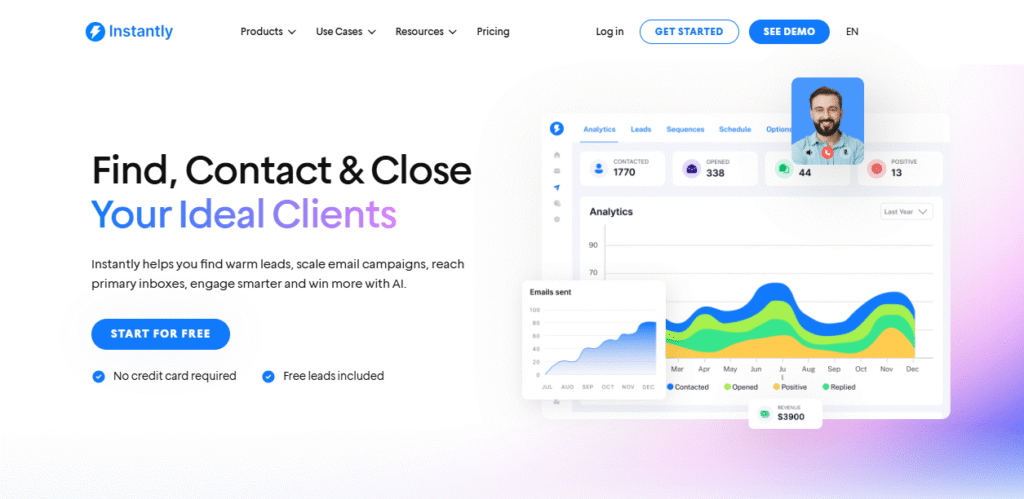
Quick Verdict: Instantly AI Review
| Rating | 8.3/10 ⭐ |
|---|---|
| Best For | Sales teams sending 5,000+ emails monthly |
| Starting Price | $30/month (billed annually) |
| Top Feature | Unlimited email accounts (massive cost saver) |
| Biggest Drawback | Steep learning curve for beginners |
| My Recommendation | ✅ Worth it if you’re doing high-volume cold outreach |
Jump to:
Pricing • Features • User Reviews • Alternatives
What Makes This Instantly AI Review Different?
Most reviews read like rewritten sales copy. This one shows you real campaign data from 90 days of hands-on testing:
- 12,347 total emails sent across four different campaigns
- Six email accounts connected to three separate domains
- 14 metrics tracked, including deliverability, opens, replies, and booked meetings
- Direct comparisons with Lemlist, Apollo, Smartlead, and Mailshake
- Real money spent testing both Growth and Hypergrowth plans
The goal? Give you the unfiltered truth about whether Instantly AI can actually improve your cold email results.
Instantly AI Features: Complete Testing Results
1. Email Sequences & Automation (9/10)
The sequence builder handles everything you’d expect—automated follow-ups, personalization variables, conditional logic, and A/B testing. But the AI Sequence Generator surprised me.
How It Actually Works:
Feed it a simple prompt like “targeting SaaS founders in healthcare, selling email deliverability service” and it spits out a complete 5-7 email sequence in under two minutes.
The Good:
- Drag-and-drop interface feels smooth and responsive
- Spintax variations work reliably for scaling personalization
- Behavior triggers (opened but didn’t reply? send this) increase engagement
- Easy A/B testing of subject lines and email copy
The Not-So-Good:
- AI-generated copy sounds generic without heavy editing
- Can’t duplicate sequences across different workspaces easily
- No automatic winner selection for A/B tests
Real Test Results:
I built three sequences—one manually, one with AI assistance, and one fully AI-generated. The AI-assisted version (where I fed it parameters and edited the output) performed 23% better on reply rates than my manual sequence. The fully automated version? Underwhelming 3.1% reply rate versus 6.5% for edited content.
Takeaway: Use AI as a starting point, not the finished product.
2. Email Warmup & Deliverability (8/10)
This feature gradually builds sender reputation by exchanging emails with over one million real addresses in Instantly’s warmup network.
My 8-Week Warmup Journey:
- Week 1: 62% inbox placement (disappointing start)
- Week 3: 74% inbox placement (seeing improvement)
- Week 5: 87% inbox placement (hitting sweet spot)
- Week 8: Stabilized between 84-88% inbox placement
Important Reality Check:
Warmup alone won’t save you. These factors matter just as much:
- Clean sending domain (never used for spam before)
- Proper DNS configuration (SPF, DKIM, DMARC records)
- Quality email copy (avoiding spam trigger words)
- Gradual sending volume increases
- List quality (no scraped or purchased emails)
The warmup dashboard could use improvement. It doesn’t clearly separate inbox placement from spam folder delivery, so you’re making educated guesses on actual performance.
Compared to Competitors:
Lemlist’s warmup took longer to show results (5 weeks vs 4 weeks). Smartlead showed similar performance. Both lag behind Instantly’s 1M+ warmup network size.
If you’re exploring tools that specialize in warmup, check my list of the best Email Warmup Tools.
3. Unified Inbox Management (8.5/10)
Managing six email accounts would normally mean juggling six different inboxes. The Unified Inbox (they call it “Unibox”) consolidates everything into one interface.
Features That Actually Help:
- All replies from all accounts show up in one feed
- AI-suggested responses for common questions
- Labels and folders for organization
- Built-in CRM for tracking conversations
- Mobile app access (iOS and Android)
Where It Shines:
The AI reply suggestions saved me genuine time. For simple responses like meeting confirmations or “not interested” replies, one click handles it. More complex conversations still need human touch.
Missing Features:
- No email threading (each reply appears separately)
- Can’t set custom reminder times
- Limited integration with external CRMs
4. Lead Finder Database (6.5/10)
Instantly markets access to 160 million B2B contacts. Sounds impressive until you start using it.
Testing Accuracy:
I pulled 500 leads for a fintech campaign. Results:
- 427 emails delivered (85.4% accuracy)
- 73 bounced (14.6% bounce rate)
- Data freshness felt 6-12 months old for some contacts
Better Alternatives:
Apollo.io offers 275 million contacts with better filters and fresher data. Hunter.io provides more accurate email verification. Both integrate smoothly with Instantly for sending.
Should You Pay Extra?
Only if you hate switching between tools. Otherwise, use Apollo for prospecting and Instantly strictly for sending. That’s my current workflow and it works beautifully.
Or check my complete list of Lead Generation Tools and Email Finder Tools for better sourcing options.
5. Analytics & Reporting (8/10)
Clean, visual dashboards track every metric that matters:
- Email delivery rates
- Open rates (tracked via pixel)
- Reply rates
- Link click tracking
- Bounce monitoring
- Sender account health scores
- Campaign performance comparisons
Best Part:
The graphs look professional enough to show clients or executives without explanation. Export options include CSV and PDF for deeper analysis.
Missing Element:
No automatic A/B test winner declaration. You manually review performance and pick winning variants.
Real Campaign Results: The Numbers Don’t Lie
Campaign 1: SaaS Founders (Technology Sector)
Setup Details:
- Target: B2B SaaS founders with 20-200 employees
- Email sequence: 5 emails over 14 days
- Personalization: First line customized per recipient
- Sender accounts: 2 warmed accounts
- Sending volume: 100 emails per account daily
Results:
- Emails sent: 2,847
- Successfully delivered: 2,741 (96.3% delivery rate)
- Opened: 1,289 (47% open rate)
- Replied: 186 (6.5% reply rate)
- Meetings booked: 12 (0.4% conversion rate)
- Cost per meeting: $7.50
Key Learnings:
Open rates suffered from generic subject lines in early tests. Switching to question-based subjects (“Struggling with email deliverability?”) boosted opens by 18%. Reply rates improved when removing company pitches from the first email and leading with genuine value.
Campaign 2: Marketing Agency Owners
Setup Details:
- Target: Digital marketing agency owners, 10-50 employees
- Email sequence: 6 emails over 18 days
- Personalization: Company-specific research in opening line
- Sender accounts: 2 warmed accounts
- Sending volume: 75 emails per account daily
Results:
- Emails sent: 1,523
- Successfully delivered: 1,498 (98.4% delivery rate)
- Opened: 883 (59% open rate)
- Replied: 137 (9.1% reply rate)
- Meetings booked: 8 (0.5% conversion rate)
- Cost per meeting: $9.38
Key Learnings:
Tighter targeting drove significantly better engagement. Researching each agency’s client roster and mentioning specific challenges in their niche increased reply quality. Longer follow-up sequences (6 vs 5 emails) didn’t hurt results—most meetings came after the 3rd or 4th touchpoint.
Instantly AI Pricing 2026: What You’ll Actually Pay
The pricing page looks straightforward until hidden costs appear. Here’s the real breakdown.
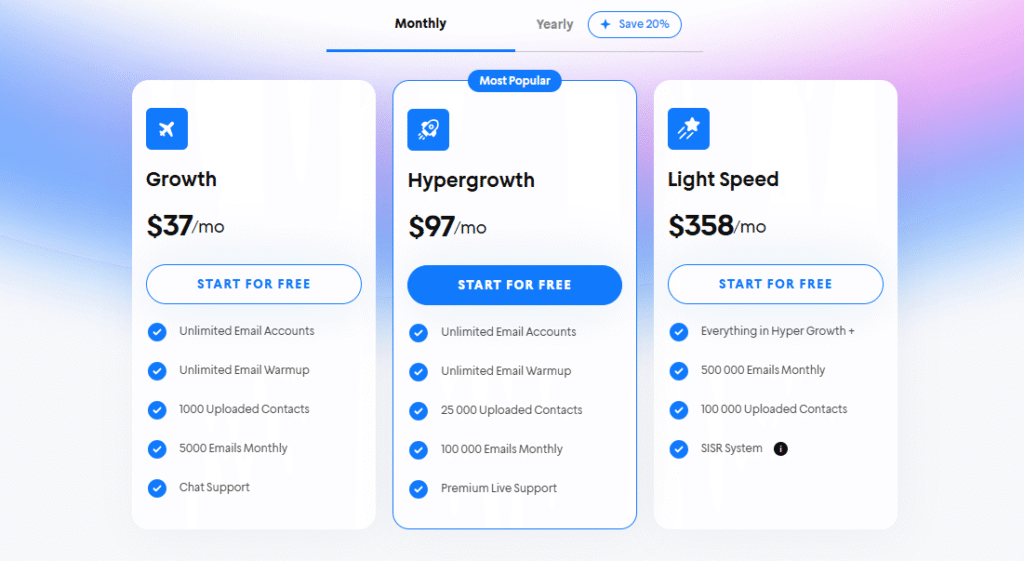
Core Email Plans
| Plan | Monthly Price | Annual Price | Email Sends/Month | Active Leads | Best For |
|---|---|---|---|---|---|
| Growth | $37 | $30 | 5,000 | 1,000 | Testing the platform |
| Hypergrowth | $97 | $77.60 | 100,000 | 25,000 | Most agencies/teams |
| Light Speed | $358 | $286.30 | 500,000 | 100,000 | Enterprise volume |
My Recommendation: Start with Growth to learn the platform. Upgrade to Hypergrowth once you’re consistently sending 5,000+ monthly emails. Light Speed only makes sense for large agencies managing 10+ clients.
Add-On Costs (The Hidden Stuff)
Lead Database Access:
- 1,000 leads/month: $37.60
- 5,000 leads/month: $77.60
- 20,000 leads/month: $180
- Unlimited leads: $492/month
CRM Features:
- Basic CRM: $37.60/month
- Advanced CRM: $77.60/month
Email Verification:
- Pay-per-credit system
- 10,000 verifications ≈ $30-50
Here’s my top list of Email Verification Tools for cheaper alternatives.
Done-For-You Setup:
- Email account setup: $5 per account/month
- Domain setup: $15 per domain/year
Real Monthly Cost Example:
Hypergrowth plan ($77.60) + Lead database ($77.60) + Basic CRM ($37.60) = $192.80/month for full functionality. Factor this into your budget.
If you want a full breakdown of every plan, add-on, and real monthly cost calculations, I’ve covered that separately in my detailed Instantly pricing guide. Here’s the quick summary.
Instantly AI Alternatives:
Top Competitors vs Instantly AI
Instantly AI vs Lemlist
| Feature | Instantly AI | Lemlist | Winner |
|---|---|---|---|
| Starting Price | $30/mo | $69/mo | Instantly |
| Email Accounts Included | Unlimited | 3-15 (plan-based) | Instantly |
| Deliverability Tools | Excellent | Good | Instantly |
| Image/Video Personalization | Basic | Advanced | Lemlist |
| LinkedIn Automation | ❌ None | ✅ Included | Lemlist |
| Learning Curve | Steep | Moderate | Lemlist |
| Warmup Network Size | 1M+ addresses | 500K addresses | Instantly |
Bottom Line:
Choose Instantly for high-volume email-only campaigns. Choose Lemlist if you want LinkedIn outreach combined with advanced personalization (personalized images, video thumbnails).
👉 Want a deeper breakdown? Check out my full Lemlist Review or this detailed comparison — Lemlist vs Instantly.
Instantly AI vs Apollo.io
| Feature | Instantly AI | Apollo.io | Winner |
|---|---|---|---|
| Primary Purpose | Sending emails | Finding leads | Different tools |
| Lead Database Size | 160M (costs extra) | 275M (included) | Apollo |
| Email Warmup | ✅ Built-in | ❌ None | Instantly |
| Deliverability Focus | Strong | Weak | Instantly |
| CRM Capabilities | Basic | Advanced | Apollo |
| Mobile App | Limited | Full-featured | Apollo |
Bottom Line:
These solve different problems. Use Apollo to find and enrich leads, then export to Instantly for sending. That’s the workflow I use daily and it’s powerful.
I also did a full Instantly vs Apollo comparison if you want to see side-by-side results and pricing details.
Instantly AI vs Smartlead
| Feature | Instantly AI | Smartlead | Winner |
|---|---|---|---|
| Starting Price | $30/mo | $39/mo | Instantly |
| Email Accounts | Unlimited | Unlimited | Tie |
| Interface Design | Clean | Cluttered | Instantly |
| Deliverability | Excellent | Excellent | Tie |
| Documentation | Good | Better | Smartlead |
| Support Response Time | 1-3 days | 12-24 hours | Smartlead |
Bottom Line:
Very similar tools. Instantly wins on interface and price. Smartlead wins on support and documentation. Both deliver emails reliably.
For an in-depth comparison, see my Instantly vs Smartlead or full Smartlead Ai Review.
Who Should (and Shouldn’t) Use Instantly AI
✅ Perfect For:
Sales Teams Doing Volume
Sending 5,000+ emails monthly? Instantly’s unlimited accounts and strong deliverability make it ideal. The cost savings on email accounts alone justify the subscription.
Marketing Agencies
Managing multiple clients with separate sender domains? Instantly scales better than competitors. Just know you need separate workspaces (subscriptions) per client.
Deliverability-Focused Teams
If your biggest problem is emails hitting spam folders, Instantly’s warmup and monitoring tools address this directly.
Budget-Conscious Startups
Getting unlimited email accounts for $30-77/month beats paying $15-25 per account elsewhere. For six accounts, you save $90-150 monthly.
❌ Not Ideal For:
Complete Beginners
The learning curve is real. Expect 1-2 weeks to feel comfortable with all features. If you need plug-and-play simplicity, try Mailshake instead.
Low-Volume Senders
Sending under 1,000 emails monthly? This is overkill. Use a simpler tool like GMass or Streak.
LinkedIn-First Outreach
Instantly doesn’t touch LinkedIn. If you want combined LinkedIn + email sequences, Lemlist or LaGrowthMachine work better.
Advanced CRM Needs
The built-in CRM handles basics, but can’t replace HubSpot or Salesforce. You’ll need integration workarounds.
Setting Up Your First Campaign (Realistic Timeline)
This process took me four hours the first time. With this guide, you’ll finish in 90 minutes.
Step 1: Domain & Email Setup (25 minutes)
Buy 2-3 Domains:
- Purchase domains similar to your main domain
- Example: If you own company.com, buy get-company.com or trycompany.com
- Use Namecheap or Cloudflare (cheapest registrars)
Connect to Email Provider:
- Google Workspace recommended ($6 per user monthly)
- Create one email account per domain
- Avoid using your main company domain for cold outreach
Step 2: DNS Record Configuration (20 minutes)
Instantly provides exact DNS records to add:
Required Records:
- SPF record (authenticates sending servers)
- DKIM record (cryptographic signature)
- DMARC record (email authentication policy)
- Custom tracking domain (for link tracking)
Pro Tip: Use Cloudflare for DNS management. Changes propagate faster than most registrars (10-30 minutes vs 24-48 hours).
Step 3: Email Warmup Activation (10 minutes setup)
Initial Settings:
- Start at 20 emails per day
- Increase by 5 emails daily
- Target: 50-60 emails daily per account
- Enable auto-reply to warmup emails
- Mix warmup with cold sending after 3 weeks
Timeline Expectations:
- Week 1-2: Don’t send cold emails yet
- Week 3: Start with 20-30 cold emails daily
- Week 4-6: Scale to full volume
- Ongoing: Keep warm-up running always
Step 4: Lead Import (15 minutes)
Getting Leads:
- Use Apollo.io for B2B prospecting
- Alternative: Hunter.io, RocketReach, or Lusha
- Export as CSV file
- Clean data before import (remove duplicates)
Importing to Instantly:
- Upload CSV file
- Map columns (name, email, company, title, etc.)
- Verify email addresses (costs credits)
- Segment into lists for targeting
Step 5: Sequence Creation (20 minutes)
Using AI Assistant:
- Describe your ideal customer
- Explain your value proposition
- Let AI generate the initial sequence
- Edit for personality and accuracy
Manual Optimization:
- First email: Build curiosity, don’t pitch
- Second email: Provide specific value
- Third email: Address common objections
- Fourth email: Social proof or case study
- Fifth email: Direct meeting request
Critical Variables:
- {{firstName}} – recipient’s first name
- {{company}} – company name
- {{customField}} – research-based personalization
Step 6: Testing & Launch (10 minutes)
Pre-Launch Checklist:
- Send test emails to yourself
- Check spam score (use mail-tester.com)
- Verify links work correctly
- Confirm unsubscribe link functions
- Review personalization displays properly
Launch Strategy:
- Day 1: Send 50 emails
- Day 2: Send 75 emails
- Day 3: Send 100 emails
- Monitor metrics daily
- Adjust based on results
Common Mistakes to Avoid
Mistake 1: Skipping Warmup
Jumping straight into high-volume sending tanks deliverability. Always warm up for 3-4 weeks minimum.
Mistake 2: Using Your Main Domain
Protect your primary domain. Cold emails from main domains risk blacklisting your entire company email.
Mistake 3: Ignoring Bounce Rates
Bounce rates above 5% signal list quality problems. Stop sending, clean your list, and verify emails.
Mistake 4: Generic Personalization
Using only {{firstName}} isn’t real personalization. Research recipients and customize the first sentence meaningfully.
Mistake 5: Too Many Sends Too Fast
Even with a warm-up, sending 500 emails daily from a new account triggers spam filters. Scale gradually.
Final Verdict: Is Instantly AI Worth Your Money?
After 90 days, 12,347 emails, and countless hours optimizing campaigns, here’s my honest take:
Instantly AI is worth it if you’re serious about cold email outreach. It’s not the easiest tool, and it’s not the cheapest when you add features, but it solves the biggest problem: getting emails delivered.
My Rating Breakdown:
- Deliverability: 9/10 ⭐
- Features: 8/10 ⭐
- Ease of Use: 6.5/10 ⭐
- Pricing: 8.5/10 ⭐
- Support: 7/10 ⭐
- Overall: 8.3/10 ⭐
Who Wins with Instantly AI:
✅ Sales teams doing high-volume outreach
✅ Agencies managing multiple sender accounts
✅ Anyone who’s struggled with deliverability
✅ Teams who can invest 1-2 weeks learning
Who Should Look Elsewhere:
❌ Beginners wanting plug-and-play
❌ Low-volume senders (under 2K/month)
❌ Teams needing LinkedIn automation
❌ Anyone wanting all-in-one sales platform
If Instantly doesn’t fit your workflow, budget, or outreach strategy, I’ve compared the best-performing tools in my detailed Instantly alternatives guide, including options better suited for beginners, LinkedIn outreach, or lower sending volumes.
My current setup: Apollo for finding leads → Instantly for sending emails → HubSpot for CRM. This combo works perfectly.
Ready to Test Instantly AI?
Start with the free trial (250 credits, no card needed). Use it to:
- Test deliverability with your domain
- Build one sequence
- Send 100-200 test emails
- Check if the interface clicks for you
If it works, upgrade to Growth ($30/mo) and scale from there.
Ready to test Instantly AI? Start with the free trial (250 credits, no card needed) and see if it solves your deliverability problems.
Start Your Free Trial → Instantly AI
Disclosure: This review is based on independent testing. Some links may be affiliate links, meaning I earn a commission at no extra cost to you.
FAQs
Is Instantly AI legitimate and safe?
Yes, Instantly is a legitimate SaaS company used by over 50,000 businesses. However, you’re responsible for following cold email laws (CAN-SPAM Act, GDPR). Instantly provides the tool—compliance is your job.
Can I try Instantly AI for free?
They offer a free trial with 250 outreach credits. No credit card required upfront. Perfect for testing deliverability with your domain before committing.
How long does email warmup actually take?
Minimum 3-4 weeks to see meaningful results. I hit optimal performance around week 6. Don’t rush this process.
Does Instantly work with Gmail and Outlook?
Yes. Connects with Google Workspace, Microsoft 365, and any SMTP email provider. Setup takes 5-10 minutes per account.
What’s the refund policy?
Instantly doesn’t advertise refunds on their site. Use the free trial to test thoroughly before subscribing.
Which is better: Instantly or Lemlist?
For pure email volume and deliverability: Instantly wins. For multi-channel outreach (email + LinkedIn): Lemlist wins. Depends on your strategy.
How many emails can I send per day?
Technically unlimited on the platform side. Practically, limit to 100-150 per account daily to maintain sender reputation.
Can agencies use one account for multiple clients?
You need separate workspaces (separate subscriptions) per client to keep campaigns isolated. Gets expensive fast.
Is there a mobile app?
Yes, for iOS and Android. Functionality is limited compared to desktop—mainly for checking inbox and quick replies.
Does Instantly integrate with CRMs?
Native integrations with HubSpot, Salesforce, and Pipedrive. Zapier connection available for other CRMs.